Potheeswaran
 A newly documented campaign, tracked by Securonix Threat Research and dubbed SMOKE#SCREEN, shows attackers weaponizing one of IT’s most trusted tools, ConnectWise’s ScreenConnect RMM software, to gain silent, persistent remote access to Windows and macOS machines, all while hiding behind Cloudflare tunnels and Dropbox links.
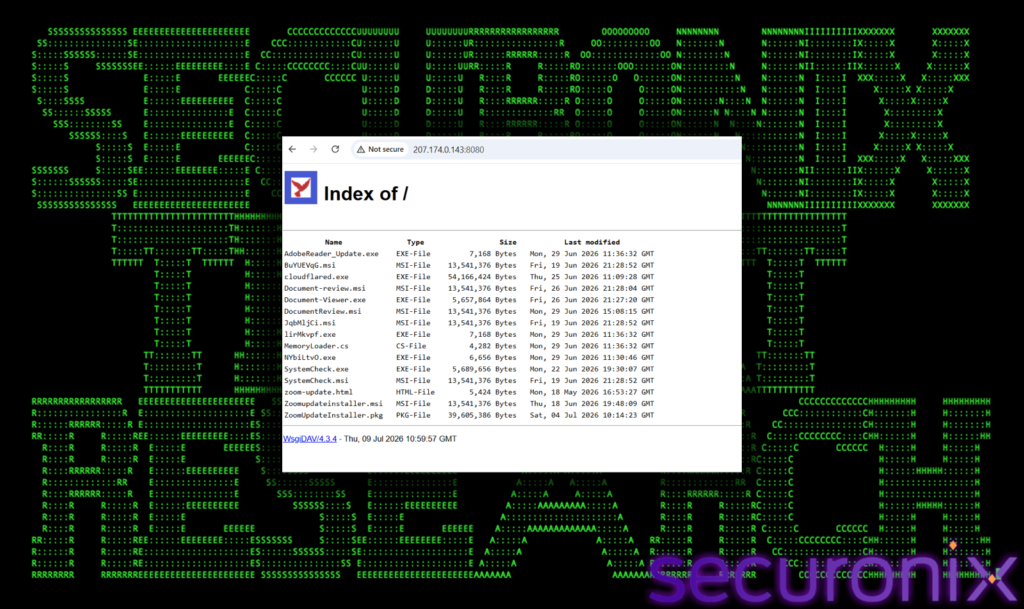
The investigation started small: a single suspicious file, zoom-update.vbs, submitted to Securonix telemetry. Pulling that thread led researchers Shikha Sangwan, Akshay Gaikwad, and Aaron Beardslee to an exposed WsgiDAV staging server at 207.174.0.143:8080 that openly listed 15 payloads with no access controls.
That same IP doubled as a live ScreenConnect relay on port 8041, meaning one machine both infected victims and commanded them.
Mapping configuration strings baked into the MSI and EXE files revealed three separate relay clusters, each with independent RSA key pairs: a primary node on 207.174.0.143, a secondary at 142.202.191.225, and a tertiary hidden behind the domain blog.derrspecial-onlinedmin.live. That compartmentalization means burning one relay doesn’t take down the whole operation.
Four Lures, One Outcome
Victims are baited through four distinct pretexts: fake Zoom and Adobe update prompts, spoofed business-document reviews, and a “SystemCheck” maintenance utility designed to make a UAC elevation prompt look routine.
Researchers’ coverage notes this diversity is deliberate: Zoom/Adobe lures target BYOD users, document lures exploit office email habits, and the SystemCheck theme primes victims to approve admin prompts without suspicion.
Regardless of entry point, every chain ends the same way: a legitimately DigiCert-signed ScreenConnect MSI installs quietly and beacons to an attacker relay using default “Guest Access” parameters.
The toolkit’s evolution is the campaign’s most striking feature. Early VBScript droppers used XOR encryption, sandbox-detection checks (aborting if Wireshark, Process Monitor, or VM tools were running), and state-machine obfuscation.
Later batch-file and .NET loaders escalated dramatically, disabling AMSI, killing SmartScreen, and adding C:\ itself as a Windows Defender exclusion before deployment. Then, mid-investigation, the actor abruptly reversed course.
A rewritten loader dropped the aggressive Defender-killing routine entirely, replacing it with a quiet 180-second delay accompanied by a source-code comment reading // WAIT 3 MINUTES (Breaks Elastic correlation). That single line is rare, direct evidence of an adversary actively testing against a named commercial EDR product.
The campaign also expanded to macOS via a ZoomUpdateInstaller.pkg connecting to the same primary relay, confirming cross-platform intent.
Because payload hashes rotate between download sessions and the final binary is authentically signed, signature- and reputation-based tools largely fail here.
Securonix recommends blocking MSI execution from temp/download directories, alerting on Defender-tampering commands, auditing all RMM traffic to raw IPs instead of vendor domains, enforcing strict UAC prompts, and watching for anomalous powershell.exe-to-msiexec.exe chains with silent-install flags.
About the Author


 Kiran
Kiran