Kiran
Kiran 
Microsoft is rolling out one of the most substantial File Explorer updates in years to Windows Insiders, targeting the exact friction points users complain about most: sluggish right-click menus, freezes during renames, and a Home view that flickers on reload.
The update, detailed by Windows Insider Program author Michael Novak on August 17, 2026, pairs deep performance engineering with a redesigned, customizable context menu, a direct response to years of Feedback Hub complaints about a feature nearly every Windows user touches dozens of times a day.
Microsoft’s own framing is telling: users remember the worst moments in an app far more than the smooth ones. A single freeze while renaming a file or a slow right-click can outweigh dozens of glitch-free interactions.
Windows 11 Context Menu Gets Major Overhaul
Guided by that principle, the company says it has profiled File Explorer end-to-end and eliminated “dozens of potential stalls and interruptions,” resulting in faster launches and fewer freezes or flashes while browsing, renaming, navigating, or selecting multiple files.
This work extends the broader Windows quality commitment Microsoft outlined in March 2026 and reaffirmed in a July 31 update, which emphasized performance, reliability, and craftsmanship over flashy new features.
Beyond raw speed, Microsoft addressed several long-standing annoyances. File renames will no longer be interrupted by background cloud-sync activity, and case-only filename changes (like renaming “report.docx” to “Report.docx”) now apply instantly instead of silently failing or lagging.
The Address Bar now accepts a wider range of input formats, including paths with quotation marks and double backslashes, and middle-click-to-open-in-new-tab now works from both the Address Bar and Home page folders.
Home also remembers which sections were expanded or collapsed between sessions, file sizes now display in appropriate units (KB, MB, GB) rather than raw byte counts, and the Details pane has been reorganized for easier scanning of file properties.
The centerpiece of the update is a redesigned context menu, the first major rework since Windows 11 introduced its rounded, icon-driven menu in 2021.
That original design had grown cluttered and slow over time, partly because every third-party app extension adds processing overhead each time the menu opens.
Microsoft’s fix is twofold: a leaner default menu that reduces top-level clutter, and engineering changes under the hood that cut the delay between right-click and a fully rendered menu. Commonly used actions stay front and center, while deeper options move a single click away.
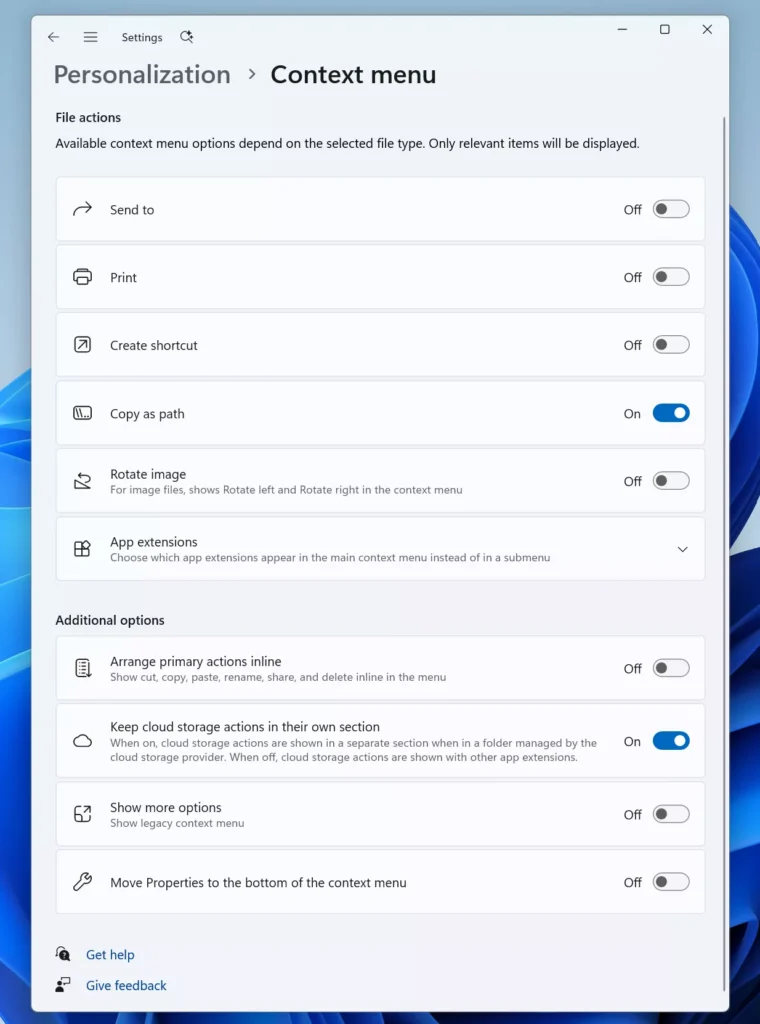
A “Customize menu” shortcut now sits at the bottom of the context menu, linking to a new Context Menu page under Settings > Personalization.
It’s organized into three controls: toggling built-in commands like Send to, Create shortcut, or the newly re-enabled Print option; managing which third-party app extensions appear in the main menu, a submenu, or nowhere at all; and restoring Windows 10-style muscle memory by listing Cut, Copy, Paste, Rename, Delete, and Share as inline text instead of icons, or moving Properties to the bottom of the menu.
For security-conscious users and IT administrators, a leaner context menu with granular extension controls also has a practical side benefit: it makes it easier to audit and disable shell extensions installed by third-party software, a vector sometimes abused by adware or poorly sandboxed applications to persist visibility in the OS.
Microsoft says this release is an early step in an ongoing, iterative overhaul of File Explorer, with further updates expected in future Insider builds as feedback continues to shape the design.
Site: Thecyberdef.com
Follow TheCyberDef on Google News, LinkedIn & X for the latest cybersecurity updates. Stay informed.
About the Author